When a customer reports they cannot log in or haven't received a token, provide them with the reset link and clear instructions.
Action: Send the reset link: https://client.eventhub.com.au/forgot_password
Note: Advise the customer: "If you don't see the email within a minute or two, please check your Junk or Spam folder, as automated tokens can sometimes be filtered there."
If the customer confirms they have checked their Junk folder and still have nothing, you must check the delivery logs.
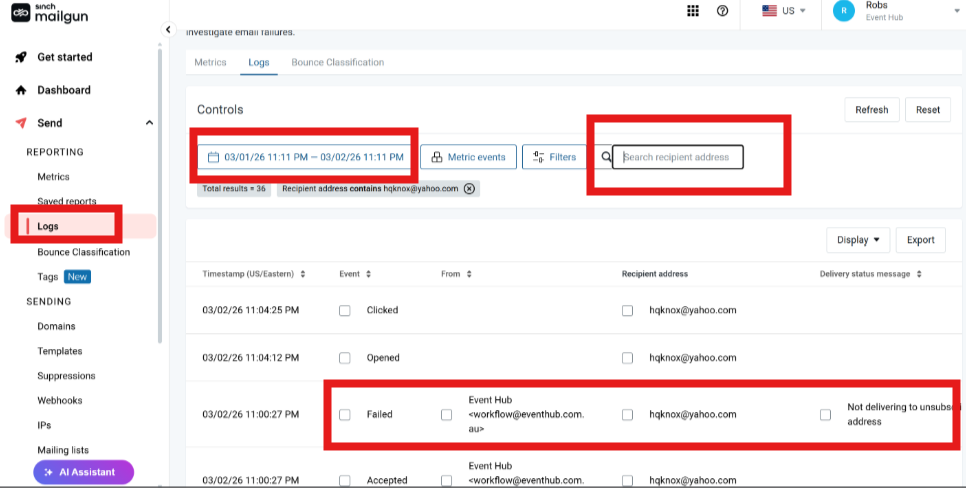
Action: Log in to Mailgun.
Set your search to 7 Days. If the user says they’ve been having issues for a while, you need that wider window. At an absolute minimum, check the last 24 hours.
Search: Filter by the customer’s email address.
Check Status:
If it says "Accepted": The issue is likely on the customer's email provider side
If it says "Failed”: This is a system issue.
If Mailgun shows a "Fail" OR if it shows "Accepted" but the user still isn't receiving it, escalate to devs via Slack/Jira.
Create a Jira Card so the developers can work from there.
Once you've escalated to the developers, set a reminder for yourself.
Target Response Time: 15–30 minutes.
Snooze for 1 day if the devs would need more time to resolve the issue but do not forget to set expectations to the customer
Once the developers provide a fix or a manual token:
Action: Inform the customer and ask them to try logging in while you stay on the chat.
Success Metric: Only close the ticket once they confirm they are inside the dashboard.

